- ECU data save
- ECU data initialization
- ECU data write
| Last Modified: 05-09-2023 | 6.11:8.1.0 | Doc ID: RM1000000021FET |
| Model Year Start: 2022 | Model: RAV4 | Prod Date Range: [12/2021 - 10/2022] |
| Title: AXLE AND DIFFERENTIAL: REAR DIFFERENTIAL CARRIER ASSEMBLY (for Torque Vectoring Differential): REMOVAL; 2022 MY RAV4 RAV4 HV [12/2021 - 10/2022] | ||
REMOVAL
CAUTION / NOTICE / HINT
The necessary procedures (adjustment, calibration, initialization, or registration) that must be performed after parts are removed and installed, or replaced during torque vectoring differential carrier assembly removal/installation are shown below.
Necessary Procedures After Parts Removed/Installed/Replaced
|
Replaced Part or Performed Procedure |
Necessary Procedure |
Effect/Inoperative Function when Necessary Procedure not Performed |
Link |
|---|---|---|---|
|
*: When performing learning using the Techstream.
Click here
|
|||
|
Battery terminal is disconnected/reconnected |
Drive the vehicle until stop and start control is permitted (approximately 5 to 60 minutes) |
Stop and start system |
|
|
Perform steering sensor zero point calibration |
Lane control system |
|
|
|
Parking support brake system (for Gasoline model)* |
|||
|
Pre-collision system |
|||
|
Reset back door close position |
Power back door system (for Gasoline model) |
|
|
|
Power back door initialization |
Power door lock control system |
|
|
|
Electro magnetic control coupling sub-assembly |
|
Dynamic torque vectoring AWD system |
|
|
Rear electro magnetic control clutch sub-assembly (rear differential carrier assembly) |
Disconnect system function check |
||
|
Wheel alignment adjustment |
Perform "Calibration" |
|
|
|
Suspension, tires, etc. (The vehicle height changes because of suspension or tire replacement.) |
Television camera assembly optical axis (Back camera position setting) |
Parking assist monitor system |
|
|
Panoramic view monitor system (for Gasoline model) |
|
|
|
Gas leak from exhaust system is repaired |
Inspection After Repair |
|
|
CAUTION:
To prevent burns, do not touch the engine, exhaust pipe or other high temperature components while the engine is hot.
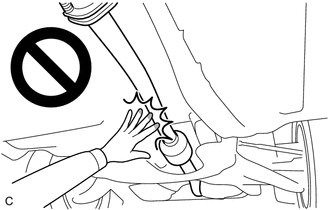
NOTICE:
- After the ignition switch is turned off, the audio and visual system records various types of memory and settings. As a result, after turning the ignition switch off, make sure to wait at least 2 minutes before disconnecting the cable from the negative (-) auxiliary battery terminal.
- When the cable is disconnected from the negative (-) auxiliary battery terminal and the security lock setting has been enabled, multi-display operations will be disabled upon next startup unless the password is entered. Be sure to check the security lock setting before disconnecting the cable from the negative (-) auxiliary battery terminal.
PROCEDURE
1. PRECAUTION
NOTICE:
After turning the ignition switch off, waiting time may be required before disconnecting the cable from the negative (-) battery terminal. Therefore, make sure to read the disconnecting the cable from the negative (-) battery terminal notices before proceeding with work.
2. DRAIN DIFFERENTIAL OIL
Click here
![2020 - 2023 MY RAV4 RAV4 HV [10/2019 - ]; MAINTENANCE: DIFFERENTIAL OIL: REPLACEMENT+](/t3Portal/stylegraphics/info.gif)
3. REMOVE PROPELLER SHAFT ASSEMBLY
Click here
4. REMOVE REAR STABILIZER BAR
Click here
5. REMOVE NO. 1 FUEL TANK PROTECTOR
Click here
6. REMOVE REAR DRIVE SHAFT ASSEMBLY LH
Click here
7. REMOVE REAR DRIVE SHAFT ASSEMBLY RH
HINT:
Use the same procedure described for the LH side.
8. DISCONNECT CABLE FROM NEGATIVE BATTERY TERMINAL
Click here
NOTICE:
When disconnecting the cable, some systems need to be initialized after the cable is reconnected.
Click here
9. REMOVE REAR SEAT ASSEMBLY
Click here
10. REMOVE CHILD RESTRAINT SEAT ANCHOR BRACKET SUB-ASSEMBLY LH
Click here
11. REMOVE TONNEAU COVER ASSEMBLY (w/ Tonneau Cover)
Click here
12. REMOVE DECK BOARD ASSEMBLY
Click here
13. REMOVE REAR NO. 3 FLOOR BOARD
Click here
14. REMOVE REAR FLOOR FINISH PLATE
Click here
15. REMOVE REAR NO. 1 FLOOR MAT SUPPORT SIDE PLATE
Click here
16. REMOVE REAR DOOR SCUFF PLATE LH
Click here
17. REMOVE REAR DOOR OPENING TRIM WEATHERSTRIP LH
Click here
18. REMOVE REAR SEAT SIDE GARNISH LH
Click here
19. REMOVE TETHER ANCHOR BRACKET SET
Click here
20. REMOVE LUGGAGE HOLD BELT STRIKER ASSEMBLY
Click here
21. REMOVE DECK TRIM SIDE PANEL ASSEMBLY LH
Click here
22. REMOVE DIFFERENTIAL SUPPORT
|
(a) Remove the 4 bolts, 2 nuts and differential support from the rear No. 2 differential support and torque vectoring differential carrier assembly. |
|
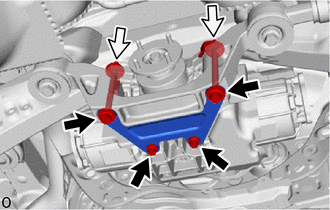
|
(b) Temporarily install the 2 bolts and 2 nuts. |
|
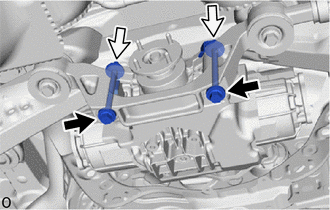
23. REMOVE TORQUE VECTORING DIFFERENTIAL CARRIER ASSEMBLY
|
(a) Disconnect the 3 connectors. |
|
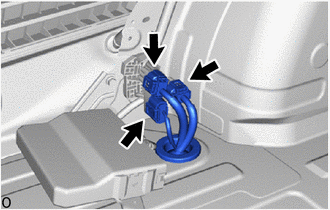
(b) Remove the grommet of the frame wire and pass the connector through the hole to the outside of the vehicle.
|
(c) w/ Height Control Sensor: (1) Disengage the 7 wire harness clamps to separate the frame wire. |
|
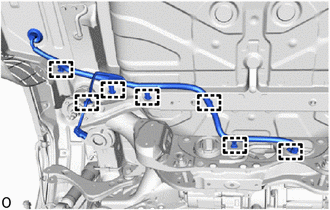
|
(d) w/o Height Control Sensor: (1) Disengage the 6 wire harness clamps to separate the frame wire. |
|
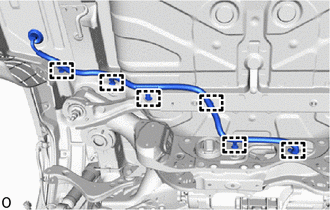
(e) Support the torque vectoring differential carrier assembly with 2 attachments or equivalent tools as shown in the illustration.
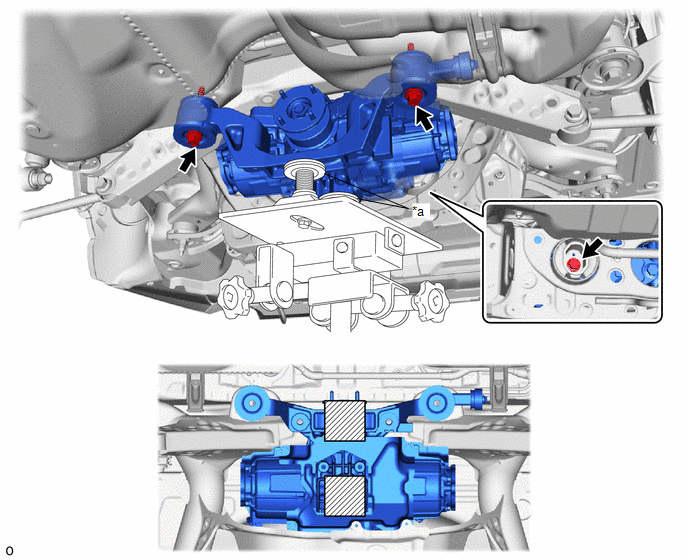
|
*a |
Attachment |
- |
- |

|
Attachment Installation Position |
- |
- |
CAUTION:
The torque vectoring differential carrier assembly is a heavy component. Make sure that it is supported securely.
NOTICE:
- Use attachments or equivalent tools to keep the torque vectoring differential carrier assembly level.
- Be careful not to damage the frame wire.
(f) Remove the 3 bolts and 2 rear lower differential mount stoppers.
(g) Slowly lower the jack and then tilt the torque vectoring differential carrier assembly.
24. REMOVE FRAME WIRE
|
(a) Disconnect the 2 connectors and breather tube. |
|
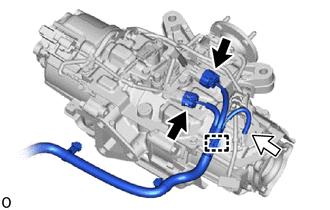
(b) Disengage the clamp to remove the frame wire.
25. REMOVE REAR NO. 2 DIFFERENTIAL SUPPORT
(a) Remove the 2 upper rear differential mount stoppers from the rear No. 2 differential support.
|
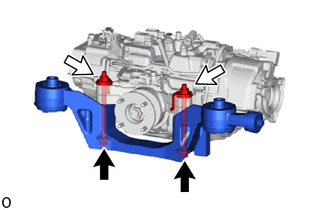
(b) Remove the 2 bolts, 2 nuts and rear No. 2 differential support from the torque vectoring differential carrier assembly. |
|
26. REMOVE REAR DIFFERENTIAL DAMPER
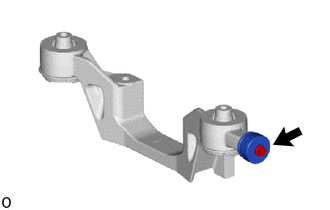
(a) Remove the bolt and rear differential damper from the rear No. 2 differential support.
27. REMOVE REAR DIFFERENTIAL SUPPORT
|
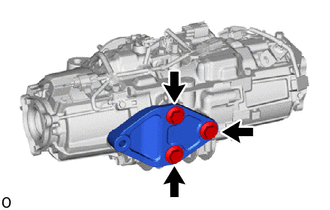
(a) Remove the 3 bolts and rear differential support from the torque vectoring differential carrier assembly. |
|

|

|