| Last Modified: 09-09-2025 | 6.11:8.1.0 | Doc ID: RM1000000014Z0F |
| Model Year Start: 2018 | Model: Camry | Prod Date Range: [06/2017 - 09/2019] |
| Title: NAVIGATION / MULTI INFO DISPLAY: NAVIGATION SYSTEM: Panel Switches do not Function; 2018 - 2019 MY Camry [06/2017 - 09/2019] | ||
|
Panel Switches do not Function |
CAUTION / NOTICE / HINT
NOTICE:
-
Depending on the parts that are replaced during vehicle inspection or maintenance, performing initialization, registration or calibration may be needed. Refer to Precaution for Navigation System.
Click here
![2018 - 2020 MY Camry [06/2017 - 10/2020]; NAVIGATION / MULTI INFO DISPLAY: NAVIGATION SYSTEM: PRECAUTION](/t3Portal/stylegraphics/info.gif)
-
When replacing the radio and display receiver assembly, always replace it with a new one. If a radio and display receiver assembly which was installed to another vehicle is used, the following may occur:
- A communication malfunction DTC may be stored.
- The radio and display receiver assembly may not operate normally.
PROCEDURE
PROCEDURE
|
1. |
CHECK PANEL SWITCH |
(a) Check for foreign matter around the switches that might prevent operation.
OK:
No foreign matter is found.
| NG |

|
REMOVE ANY FOREIGN MATTER FOUND |
|

|
2. |
CHECK PANEL & STEERING SWITCH (OPERATION CHECK) |
|
(a) Enter the "Panel & Steering Switch Check Mode" screen. Refer to Check Panel & Steering Switch in Operation Check. Click here
|
|
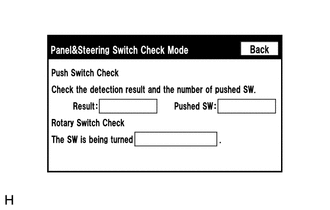
(b) Operate the abnormal switch and check if the switch status is correctly displayed.
OK:
The switch status is correctly displayed as operated.
| OK |
|
| NG |
|
PROCEED TO NEXT SUSPECTED AREA SHOWN IN PROBLEM SYMPTOMS TABLE Click here
|

|

|