| Last Modified: 06-03-2026 | 6.11:8.1.0 | Doc ID: RM1000000013TW5 |
| Model Year Start: 2018 | Model: Camry | Prod Date Range: [03/2017 - ] |
| Title: DOOR LOCK: WIRELESS DOOR LOCK CONTROL SYSTEM (w/o Smart Key System): DIAGNOSIS SYSTEM; 2018 - 2024 MY Camry [03/2017 - ] | ||
DIAGNOSIS SYSTEM
1. SELF-DIAGNOSTIC MODE (USING TECHSTREAM)
(a) Connect the Techstream to the DLC3.
(b) Turn the ignition switch to ON.
(c) Turn the Techstream on.
(d) Enter the following menus: Body Electrical / Main Body / Utility / Wireless Door Lock Diagnosis Mode.
Body Electrical > Main Body > Utility
(e) Proceed to the next step in accordance with the prompts on the Techstream screen.
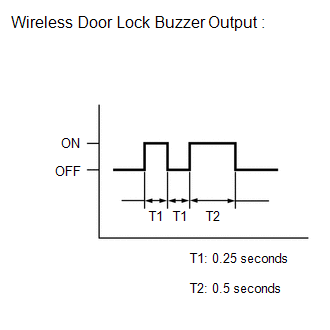
(f) Check that the system has switched to self-diagnostic mode by checking the wireless door lock buzzer output pattern.
(g) Inspect the diagnostic outputs when the door control transmitter module set sub-assembly switch is pressed. The diagnostic outputs can be checked by the wireless door lock buzzer output pattern.
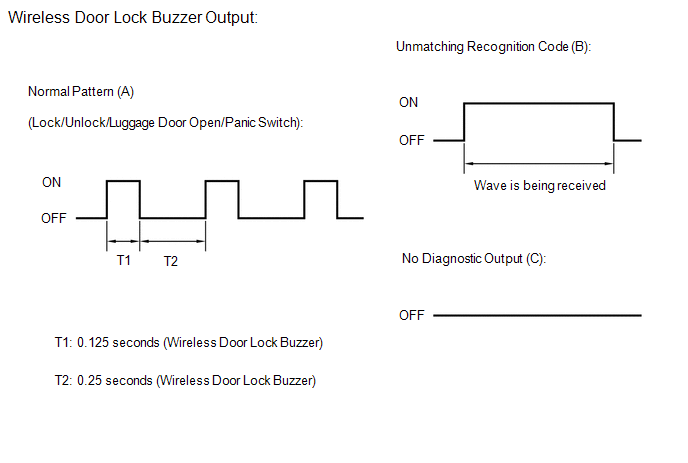
Result:
|
Wireless Door Lock Buzzer Output |
Suspected Area |
|---|---|
|
A |
Normal (No malfunction) |
|
B |
Register wireless code |
|
C |
Wave interference or malfunction of a related component |

|

|