 Service Information
General Information
Serial Data Authentication Configuration ensures secure communication between control modules over different channels by encrypting sensitive data. Secret keys are written to the control modules, allowing messages on the bus to be encrypted.
- During the process, control module data is retrieved from the vehicle to generate unique cryptographic keys.
- These keys are then written to each control module, allowing secure communication between control modules.
- In the case of control module replacement, re-running the configuration is required to introduce the new control module to the network; otherwise, communication will fail due to unrecognized messages.
Reference Information
Special ToolsEL-52100 Multiple Diagnostic Interface 2 (MDI 2)
Serial Data Authentication Configuration
Note: Before attempting to perform the Serial Data Authentication Configuration procedure,
- Make sure all CAN control modules are connected and communicating.
- Diagnose the following communication DTCs first: DTC U0073-U007E, U0100-U02FF, U1100-U12FF, U1600-U17FF, U1977, U1978, U2200-U23FF, and U2400-U25FF.
- Diagnose the following programming DTCs: U3000 51, U3000 52, U3000 53, U3000 56, and U3000 57.
- If DTC U1962 is stored only as a history DTC and not retrieved as a current DTC, do not perform the Serial Data Authentication Configuration procedure.
- DO NOT perform the Serial Data Authentication Configuration procedure unless directed to by a service procedure or a service bulletin.
- Ensure the programming tool is equipped with the latest software and is securely connected to the data link connector. If there is an interruption during programming, programming failure or control module damage may occur.
- Stable battery voltage is critical during programming. Any fluctuation, spiking, over voltage or loss of voltage will interrupt programming. Check the 12 V battery with a digital multimeter and ensure the voltage is above 12.5 V. When required, install a battery maintainer or power supply that provides a steady and stable voltage. DO NOT use a battery charger, as charging voltage will often fluctuate when connected to the vehicle. This may interrupt programing. If a battery maintainer is not available, connect a fully charged 12 V jumper or booster pack disconnected from the AC voltage supply.
- Ignition/Vehicle OFF, keep the key inside the vehicle.
- Access the Service Programming System (SPS) and follow the on-screen instructions.
- On the SPS Supported Controllers screen, select Serial Data Authentication Configuration button and follow the on-screen instructions.
- Ignition/Vehicle OFF, disconnect the scan tool from the vehicle, all access doors closed, all vehicle systems OFF, and all keys at least 3 m (9.8 ft) away from vehicle. Allow the vehicle to go into sleep mode.
- Ignition ON/Vehicle In Service Mode.
- Using a scan tool, clear DTCs.
Note: The Serial Data Authentication Configuration button is located in the lower right corner of the SPS Supported Controllers screen in the Techline Connect system.
Troubleshooting
Serial Data Authentication Configuration can fail for several reasons. After confirming all control modules are fully programmed and that no underlying issues exist, follow these steps to attempt a successful configuration:
- Verify X84 Data Link Connector (DLC) Connection: Ensure the X84 Data Link Connector is securely attached to the vehicle.
- Use a Direct MDI 2 Connection: Connect the scan tool directly to the computer via a wired connection instead of using wireless connection (Techline Connect may need to be reset to change the connection type).
- Disconnect the 12 V Battery: Reset the vehicle systems by disconnecting the 12 V battery negative cable for 1 min. For electric vehicles, check the 12 V battery voltage with a digital multimeter before disconnecting any battery cables leads. If the voltage is 13.5 V or above, the Battery Maintenance Mode is active. The technician must wait for the T18 Battery Charger to deactivate before disconnecting the battery negative cable. Follow the appropriate steps in the Battery Negative Cable Disconnection and Connection procedure located under the Starting, Charging, and Low Voltage Energy Storage category (or 12 V Starting and Charging category).
- Perform the Serial Data Authentication Configuration procedure. If the procedure still fails, inspect the X84 Data Link Connector for contamination, corrosion, and terminal tension and inspect the wiring between the X84 Data Link Connector and K56 Serial Data Gateway Module for any faults.
In the case of a Serial Data Authentication Configuration failure, the SPS error window should point to which control module is failing:
- Function: “Key Provisioning” refers to Serial Data Authentication Configuration.
- Sub Function: refers to which step in the process failed.
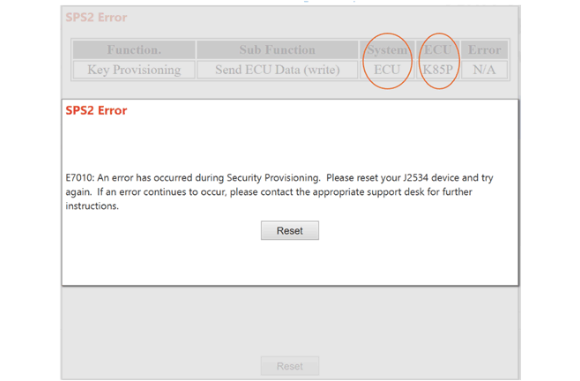
- ECU: refers to the failing control module if that is the case.
If the Sub Function column in SPS error window points to a “Configure Link” error, run through the trouble shooting steps 1-4 above.
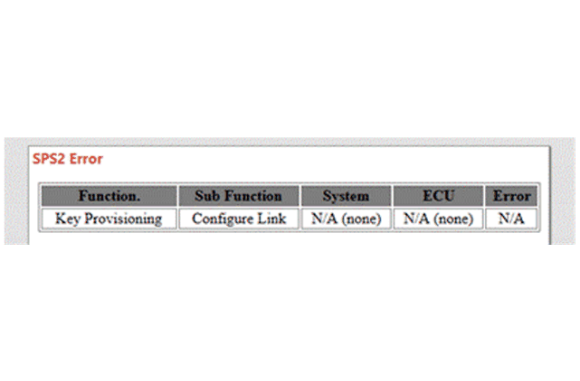
If no SPS error window is displayed, but the SPS screen indicates that Serial Data Authentication Configuration has Failed, run through the trouble shooting steps 1-4 above.
If the Sub Function column in SPS error window points to a “Request ECU Data (Read)” error, verify the vehicle power mode is off and brake pedal is not pressed. Then perform the Serial Data Authentication Configuration procedure again. If the same issue exists, perform a Battery Global Reset by following troubleshooting step 3 above.
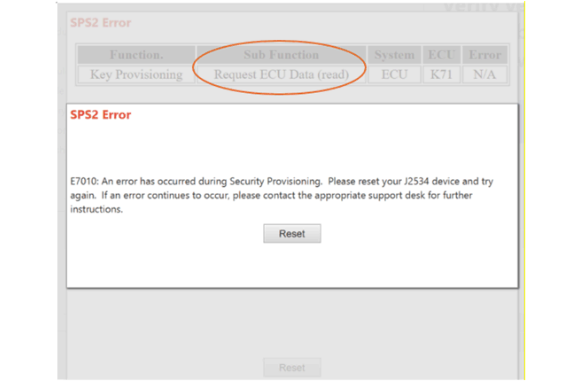
If the Sub Function column in SPS error window points to “Unlock” or “Get KeyProv Payload”, perform the Serial Data Authentication Configuration procedure again. If Techline Connect has been open for hours, close the current Techline Connect session and start a new Techline Connect session before performing the Serial Data Authentication Configuration procedure again.
If the System column in SPS error window points to a “ECU” error, and the ECU column point to a controller, verify the followings:
- The identified/failed control module (ECU) shall be fully programmed. A failed programming event prior to the Serial Data Authentication Configuration event will cause the Serial Data Authentication Configuration procedure to fail.
- The identified/failed control module (ECU) shall have the latest software. For example, the K89P Restraints Occupant Classification System Module - Passenger need to be updated to the latest software to avoid Serial Data Authentication Configuration failure.
If the Serial Data Authentication Configuration procedure passes and all controller setup procedures complete successfully, but the loss of communication DTCs and invalid data DTCs mentioned in Note #2 above are still set as current, contact the Technical Assistant Center (TAC) for support.